Search

Search the Pali Canon and its translations by a word, a phrase or a regular expression. Plenty of filters and settings narrow it down — where to search, which languages, how much context around each quote — and the Words view gives a report on every word form that was found. Try it live below (this is the real search page):
Toolbar above the results
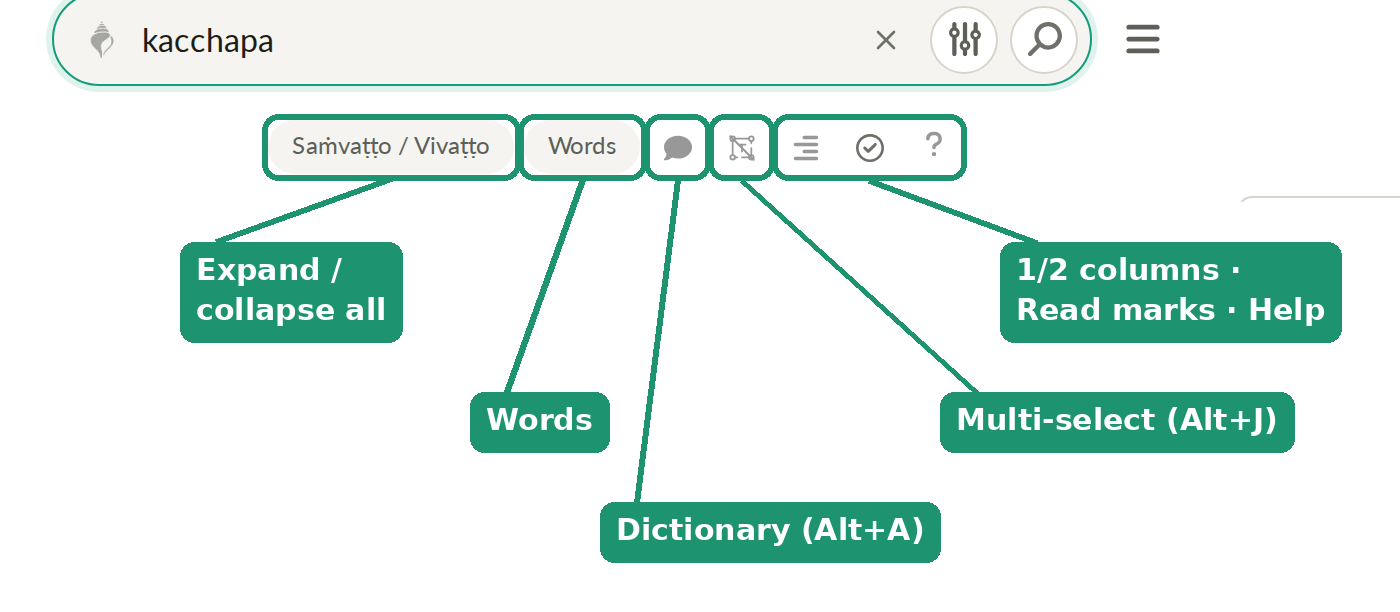
- Saṁvaṭṭo / Vivaṭṭo — yes, the labels are literally Pali ("collapsing" / "unfolding") — expands or collapses the quoted lines in every row at once (same as Shift+Space).
- Words — switches the table from a list of texts to a list of the matched words instead.
- Dictionary (speech-bubble icon, Alt+A) — turns the click-to-look-up popup dictionary on/off.
- Multi-select (Alt+J) — select several words or a whole sentence and it opens in the dictionary by itself (see Dictionary).
- 1/2 columns — toggles quotes between one wide column and Pali + translation side by side.
- Read marks — adds a "read" checkbox column to every row. These marks belong to the current result set (this query + this scope), not to the sutta as a whole — rerun the same search later and you'll see the same marks, but that's a different thing from a sutta's overall reading progress.
- Help — opens this very page.
Right under the search box, a "variants" link shows up when the word you searched for has alternate spellings elsewhere in the texts.
Basics
Search runs against the Pali root text and against translations —
usually several different translators per language (English and Russian
by default, langs=en,ru). Which one it checks first depends on the
script you type: Cyrillic (e.g. сострадание) searches Russian
translations only; Latin script or diacritic Pali (kacchapa, karuṇā)
is checked against the Pali text first, and only falls back to
non-Russian translations (typically English) if nothing matched there.
Tip #1. You can type Pali in plain Latin letters, no diacritics
required (kacchapa) — the special characters (ā ī ū ḍ ḷ ṁ ṇ ṅ ñ ṭ) are
available to copy from the RegEx Cheat
Sheet below if you want an exact query.
Tip #2. Where to search. By default search covers the 4 Nikāyas (DN, MN, SN, AN) plus part of the Khuddaka Nikāya (Dhammapada, Udāna, Itivuttaka, Suttanipāta, Theragāthā, Therīgāthā). Change this from the Quick Settings panel (the sliders icon next to the search box) — that's also where you turn on the Vinaya and pick which other Khuddaka Nikāya books to include:
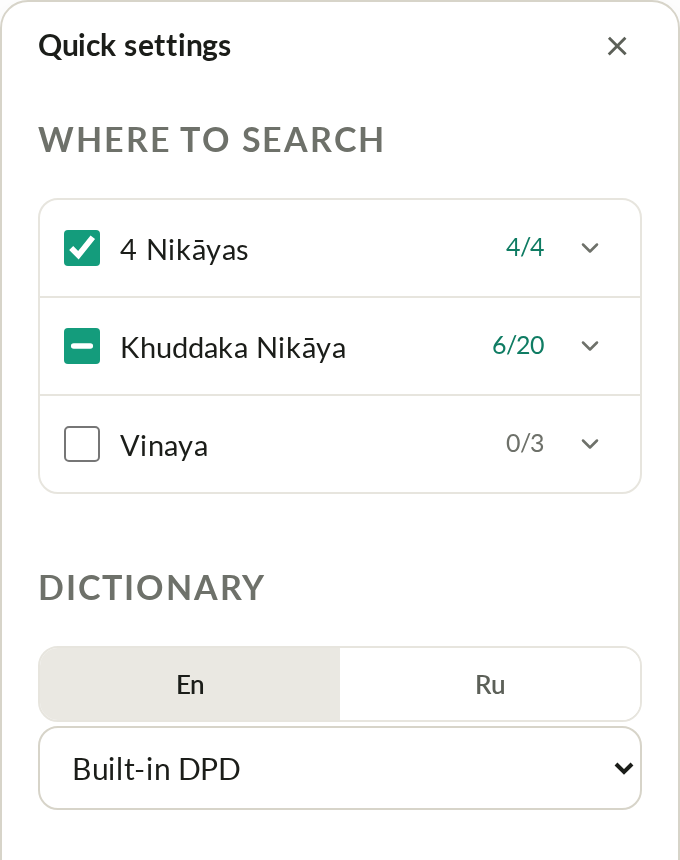
The same panel controls how many lines of context to show before/after a
quote ("Quote context") — the same setting as the lb/la parameters in
the API.
Tip #3. Too few results? Try the word's stem instead — drop the prefix or the ending.
Tip #4. Lean on Pali — it's the language the oldest Dhamma texts survive in; the Buddha didn't speak English or Russian, and any translation necessarily narrows or shifts meaning.
Tip #5. Pali search results come back in two tables: matching suttas/texts with quotes, and matches grouped by word. Use both. Other languages also build a by-word table, but it can be less reliable there.
Tip #6. Minimum query length is 3 characters; longer, more specific patterns give more precise results.
Tip #7. Pali often has several distinct words where English/Russian collapse to one (several Pali words for "snake", for instance, against one English word) — searching in Pali surfaces distinctions a translation erases.
Tip #8. If a query times out, try a longer or more specific pattern.
Type a sutta id (SuttaCentral-style, e.g. dn22) instead of a search term
and you'll land directly in the reader on that sutta, skipping search
entirely. Works for DN, MN, SN, AN, the Khuddaka Nikāya books listed
above, and the Vinaya.
The "Mr" column. Counts matches anywhere in the text (regardless of
your search term) for the pattern
seyyathāpi|adhivacan|ūpama|opama|opamma, ignoring
adhivacanasamphass|adhivacanapath|ekarūp|tathārūpa|āmarūpa|\brūpa|evarūpa|\banopam|\battūpa|\bnillopa|opamaññ.
Found a case that should be included or excluded? Open an issue on
GitHub.
Working with results
- Click at the end of a Pali line (cursor turns from an arrow into a hand) — jump into the reader right at that line.
- ✦ — an invisible link at the start and end of each quoted fragment, to open the reader at exactly that spot.
- The Search field inside the table does simple filtering of results already shown; the Custom Search Builder at the bottom does more elaborate multi-condition filtering.
- Export — download the results in a format handy for AI or analysis.
- The Words button switches the table to results grouped by word instead of by sutta.
- Below the table, links to a few standalone helper tools: Make List (build a list from arbitrary text), List Diff (compare two lists of links) and Sutta Diff (compare editions of a sutta) — each opens as its own page.
Table columns and links
- Sutta — the text's id (e.g.
sn56.11,dn22,an10.46). - Title — the text's title.
- Words — the matched words in the text.
- Count — number of matches in the text, variants included.
- Type —
4 Nikāyas(Dīgha/Majjhima/Saṁyutta/Aṅguttara),Khuddaka Nikāya(any KN book), orVinaya(anything from the Vinaya). - Quote — the quote containing the match.
- Links — Pi (read on Dhamma.Gift Read), En (TheBuddhasWords.net), Ru (Theravada.ru or Theravada.su, when available).
For edition abbreviations (ms, pts1ed, sya-all, mr, etc.), see the
Edition Abbreviations page or
SuttaCentral's list.
Hotkeys
| Key | Action |
|---|---|
| Alt+A | Toggle dictionary (clicking a word triggers DPD) |
| Alt+S | Open/close Quick Settings (the sliders icon next to the search box) |
| Alt+Shift+S | Open/close the full Settings page |
| Alt+T | Dark / light / auto theme |
| Alt+Space, Alt+Z | Show/hide Pali or other languages in results |
| Ctrl+Shift+F (Cmd+Shift+F on Mac) | Find on page (site-wide, not just here) — also in the burger menu |
| Shift+Space | Collapse/expand all search results |
| / | Put the cursor into the search field |
Advanced
Tip #1. Only works for Pali or English searches! To find a word
within a specific sutta/saṁyutta/nikāya: Sn17.*seyyathāpi returns every
simile and metaphor in Sn17. For several patterns within a scope, quote
it: "Sn51.*(seyyathāpi|adhivacan|ūpama|opama)".
Tip #2. Use [] for variants: nand[iī] matches both nandi and
nandī.
Tip #3. Use \b to anchor a word boundary: \bkummo\b matches only
kummo, not kummova or other longer matches.
Tip #4. Full GNU grep -E regex is supported (with proper escaping).
An AI can generate a pattern for you — see the RegEx cheat sheet in the
search box's settings for links.
Tip #5. Results are rendered with DataTables.
Tip #6. Collections. Quote a pattern to build a custom collection:
"sn42.8|sn20.5" returns both full suttas in one table; "Sn20.1"
returns Sn20.1, Sn20.10, Sn20.11, etc.; "Sn20.1\b" returns only
Sn20.1.
RegEx Cheat Sheet — try it live
an4.180:1.2  Cattārome, bhikkhave, mahāpadesā.
an4.180:1.3  Katame cattāro?
mn139:3.1   Seyyathāpi, bhikkhave, puriso dukkhena phuṭṭho...
sn12.2:1.1  Katamañca, bhikkhave, jarāmaraṇaṁ?
dn22:18.18  Yaṁ kho, bhikkhave, kāyikaṁ dukkhaṁ...