Settings
The real, live Settings page — nothing to click or search for here:
Quick Settings — a lighter panel right next to search
Besides this full page, there's a second, lighter panel — Quick Settings, the sliders icon next to the search box (the ⚙︎ icon left of the magnifying glass), also reachable with Alt+S. It doesn't duplicate the settings page — it gives fast access to whatever's most relevant right where you're already working: on the home screen, in search results, or in the reader, without leaving for a separate page. Which groups show up depends on where you are — here are all of them, together:
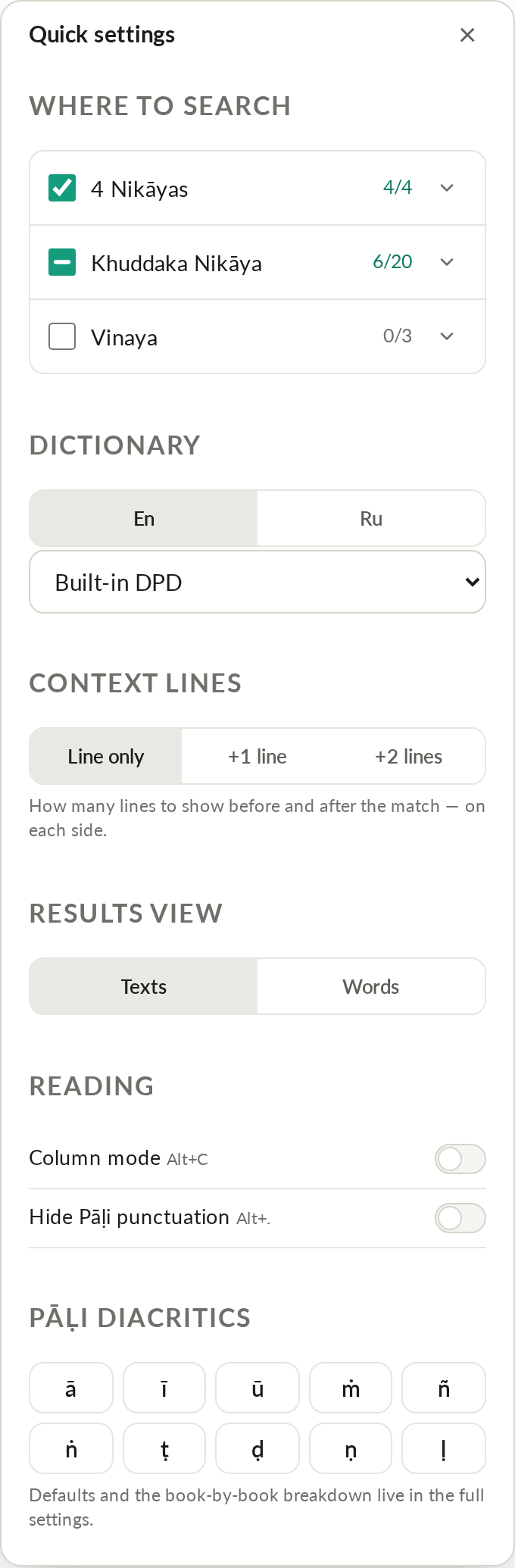
- Where to search — the same 4 Nikāyas / Khuddaka Nikāya / Vinaya toggles as "Default search scope" below on this page, but this one only changes the scope for the current query.
- Dictionary — which dictionary mode to use (see Dictionary).
- Quote context — results page only: how many lines to show before/after a match.
- Result view — Texts / Words (results page only).
- Reading — reading variants and column mode (in the reader), hide Pāḷi punctuation (anywhere there's Pali text).
- Devanagari script — only shows up while the reader is in "Devanagari" mode (see Reader).
- Pāḷi diacritics — buttons for Pali special characters (ā ī ū ṁ ñ ṅ ṭ ḍ ṇ ḷ); clicking one inserts it straight into the search box.
Changes in Quick Settings save immediately — it's the same underlying settings as the full page below, just within reach without navigating anywhere.
General
- Interface language — menus and labels (doesn't affect text languages).
- Theme — light / dark / auto. Alt+T. (Stored in
localStorage.theme— the same key this Help site itself uses for its own light/dark toggle, so switching it here or on this page keeps both in sync live, same-origin.) - Cloud — sync bookmarks, notes and settings across devices, see Login.
Reading
-
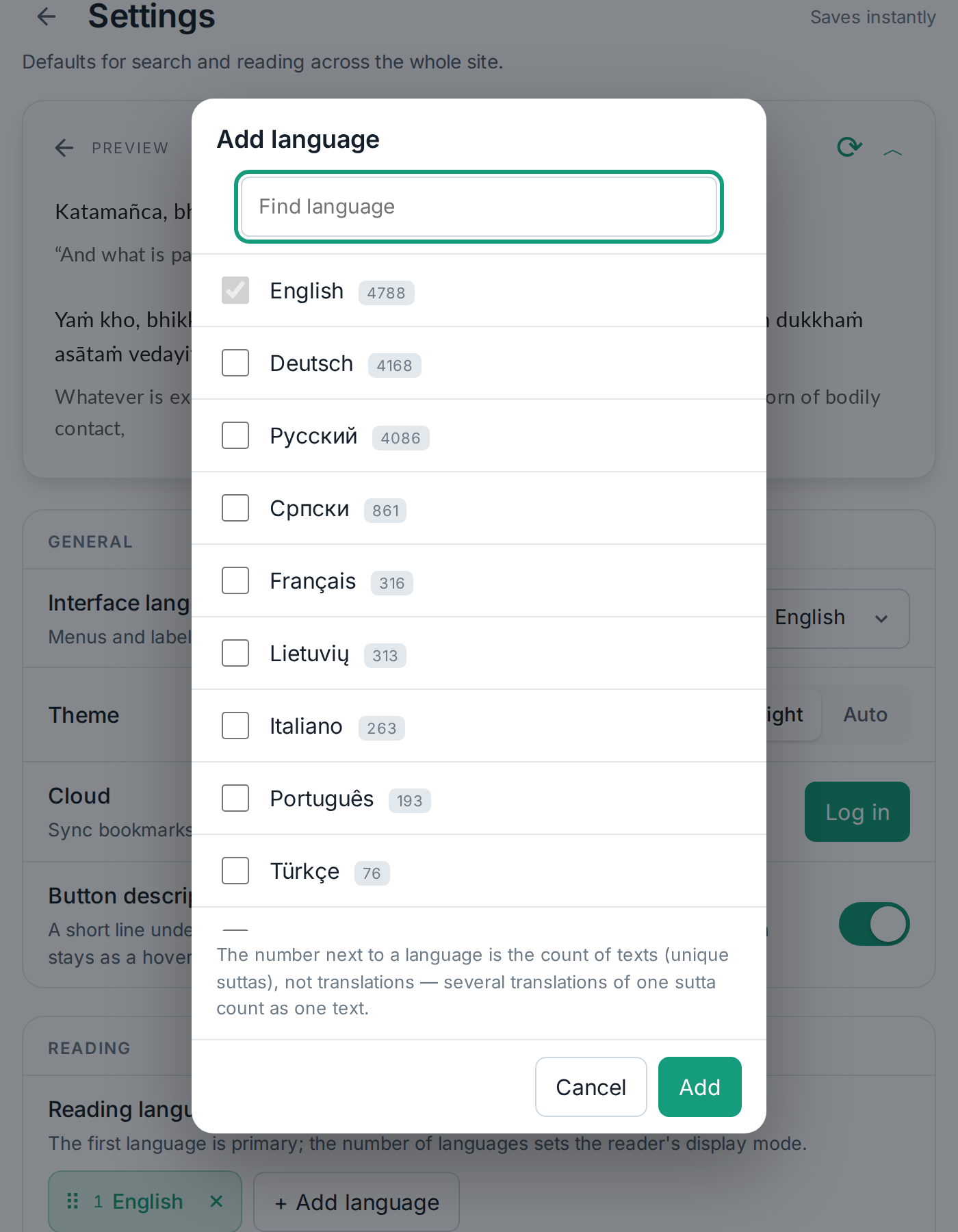
Reading languages — far more than just English and Russian: a list of about fifteen languages with a text count for each. The first one picked is your primary language, and how many you pick determines the reader's display mode (see Reading modes); drag the chips to reorder them.
-
Pali script — Latin (ISO) and other scripts (see Pali script on the Reader page). A separate toggle decides whether the choice applies everywhere or only in "Devanagari" mode.
-
Text size — plus/minus, the same Alt+= / Alt+- used everywhere on the site.
-
Show Pali punctuation — turn off to strip commas/quotes and replace periods/
?/!with a vertical bar — closer to how manuscripts look. Alt+.
Search
- Default search scope — the same 4 Nikāyas / Khuddaka Nikāya / Vinaya checkbox list as in Quick Settings, but this is the default used for new queries (you can still change the scope for one particular search).
- Search languages — match your reading languages by default; a toggle lets you set a separate language list just for search.
- Context lines — how many lines to show before/after a match, as a number rather than buttons — the same setting as "Quote context" in Quick Settings.
- Multiple words, any order — visible in the UI, but honestly labeled "not yet implemented server-side" — the toggle is disabled.
Dictionary
- Dict.DG — the master on/off switch for the dictionary platform (see Dictionary).
- Mode — exactly which window/tab opens when you click a word.
- Auto-search selected text — the same thing as the multi-select button in the reader (Alt+J): select several words and the dictionary looks them up on its own, no button click needed. Comes with a delay setting (3 or 5 seconds).
Pali root text
The Pali edition used for search and the reader. Search currently always runs against Mahāsaṅgīti (MS); the BJT, VRI and SIAM editions are shown in the UI but marked "coming soon" — not available yet.
Voice
- Google Cloud API key — your own key for higher-quality voices (stored only in this browser) — details on Voice / TTS.
- Voice and playback speed — opens a separate panel (the same one the settings icon in the reader's own player opens, Alt+R) — see Voice / TTS.
Data
- Search history and favorites — "Clear" wipes them from this device (stored locally unless you're signed in to the cloud).
- All settings — "Reset" returns everything on this page to its defaults, without touching history, favorites, or your cloud login.
Related hotkeys
| Key | Action |
|---|---|
| Alt+S | Open/close Quick Settings (the sliders icon next to search) |
| Alt+Shift+S | Open/close this full Settings page |
| Ctrl+Shift+F (Cmd+Shift+F on Mac) | Find on page — not Alt+F, that's favorites; not plain Ctrl+F either, real browsers reserve that for their own find bar |
| Alt+Z | Show/hide the second language |
| Alt+T | Theme |
| Alt+. | Strip Pali punctuation |
| Alt+J | Multi-select for the dictionary |
| Alt+= / Alt+- | Text size |
| Ctrl+1 / Ctrl+2 / Ctrl+3 | Home / Table of contents / Dictionary |
| Alt+1 | Site language |
| Alt+8 | ml/th display mode |